
Archived. This app is no longer actively maintained.
Debuggable Browser (Outdated)
Remote debugging for Android's stock WebView, from the Android 4.x era.
Debuggable Browser was an Android developer utility that exposed a debug-enabled WebView, letting you inspect and debug your web app on a real Android device using Chrome DevTools on your desktop. It filled a specific gap in the Android developer tooling of its time.
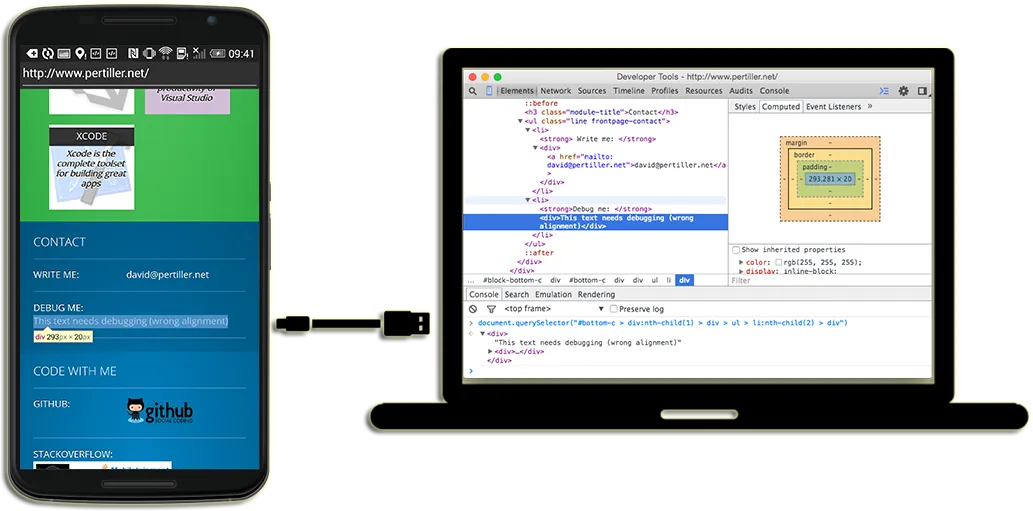
Debug-enabled WebView
The app provided a WebView with remote debugging enabled (Android 4.4+), something the Android stock browser did not offer at the time. You could load any URL and inspect it like a desktop page.
Chrome DevTools via USB
Connect your Android device via USB, enable Developer Mode, open chrome://inspect on your desktop, and the app's WebView appeared as an inspectable target with full DOM, console, network, and JavaScript debugger.
Real device bugs
Layout breaks, JavaScript exceptions, and laggy animations that only appear on real hardware were suddenly debuggable. The app was built because the stock Android browser had no remote debugging support, while Chrome for Android already did.
Install and connect
Enable Developer Mode on your Android device and connect it to your Mac or PC via USB.
Open your URL
Launch the app and navigate to your web app's URL. The WebView renders it exactly as the Android stock browser would.
Inspect in Chrome
On your desktop, open Chrome and go to
chrome://inspect. Check "Discover USB Devices" and hit Inspect on the listed page.
Debuggable Browser solved a real problem in 2014 and 2015, when Android's stock browser had no remote debugging support. As Android matured and Chrome for Android became the default browser on most devices, the specific gap this tool filled gradually closed. The app remains on the Play Store as a historical artifact but is not updated for modern Android versions.

Does this still work on modern Android?
The app has not been updated for recent Android versions. It may install and run on older devices, but it is not tested or maintained. For modern Android debugging, use Chrome for Android with the built-in remote debugging support in Chrome DevTools.
Why was this necessary?
In the Android 4.x era, Chrome for Android supported remote debugging but the stock Android WebView browser did not. Many Android-specific rendering bugs only appeared in the stock browser. This app gave developers a way to reproduce and debug those issues with proper tooling.
Are there better alternatives today?
Yes. Chrome for Android supports remote debugging natively via chrome://inspect. For testing across browsers and devices, tools like BrowserStack and Sauce Labs provide more comprehensive coverage.